Subscribe For Free Updates!

We'll not spam mate! We promise.

Showing posts with label Computer Technology. Show all posts

Sunday, March 1, 2015

A technology that could make your phone’s internet 1,000 times faster than 4G/LTE

Artemis Networks working on a new high speed pCell Wireless Technology which will give users Internet speed 1000 times faster than 4G/LTE networks


SIM’s with pCell Wireless Technology to be available in San Francisco.

Entrepreneur Steve Perlman who is well known for his invention of Web TV has now come up with a new pCell Wireless Technology which can help in accelerating the speed of internet on smartphones.
Researchers at Perlman’s new start up Artemis Networks; just a 3 year old baby, have come up with a pCell Wireless Technology which can provide about 1000 times greater internet speed as compared to 4G/LTE networks.
Consumers need to purchase a SIM card from the Artemis Network’s website to get their phones connected to pCell network. Internet users on smartphones have seen the conventional speeds of the internet from 2G to 3G to now 4G however pCell Wireless technology claims to provide 1000 times better speed than 4G networks and also boast to wipe out the “call drops” in crowded places, gatherings or stadiums, secluded areas which are normally offline due to unavailability of phone network.
The apprehensive wireless industry needs proof to believe this and hence Perlman is going to build a network of pCell Wireless Technology using DISH Network’s spectrum at San Francisco. For San Fransisco users who have an unlocked iPhone 6 or iPad Air 2, the Artemis SIM cards can be directly inserted in the device.
Reason for choosing the Apple’s iPhone for pCell to work is that Apple unlocked iPhones come with all spectrum bands built-in where Android smartphones, though unlocked have limited spectrum band options.

Concept of pCell Wireless Technology as against the traditional carriersA technology that could make your phone's internet 1,000 times faster than 4G/LTE

Normally gigantic signals emitted by the huge traditional cell towers are shared by the phones within that cell or area. As against this, pCell network is build by “hotspot like” devices known as pWaves which emit the radio waves. Also the traditional cell towers are spaced far off in such a way as to cover huge areas and their waves do not interfere each other however in pCell the pWaves are purposely spaced in such a way so that the radio waves collide with each other which helps to create an individual network for each user.
So basically Artemis would be using the criss-crossing of these radio waves to provide a higher availability of the cellular network to its users. Also as against the traditional cell towers which are huge and take a lot of space the pWaves are small, about the size of wireless router and hence can be placed anywhere.
Perlman has plans to use the rooftops in San Francisco to deploy pWaves and due to the smaller size of this unit, the overall cost of its infrastructure would be greatly reduced. He told Business Insider that larger numbers of pWaves will be placed in such a way that pCell Wireless Network can cover the area more accurately as compared to the traditional cell tower.
Perlman has plans to set up the pCell network at San Francisco first to prove his concept to the wireless industry as he sees future tie ups with the other larger carriers in other cities for pCell.
Since he is launching the pCell network only in San Francisco for now, the Artemis Networks SIM card will work on the Mobile Virtual Network Operator or MVNO network in cases when the user goes out of city limits. Basically MVNO networks are not self owned service providers and larger carriers lease out their spectrum to these MVNO. MVNOs are well known for providing voice and data serviced at lower and flexible rates.
pCell is still awaiting Federal Communications Commission (FCC) approvals and the MVNO tie up formalities. Artemis Networks has plans to go live by this fall or early next year. Perlman has assured that Artemis Network will provide different plans option for its users with unlimited data plan which will cost much lower than what the conventional carriers are charging and this will be due to the lower infrastructure and capital expenses.
However he has refused to divulge the plan rates as of now. Artemis Networks also has plans to provide device similar to a MiFi wireless router which will provide wireless network at homes. The Artemis I Hub, will be available for some mobile operators for trial from Tuesday.
An innovative approach by the Artemis team is really need of the hour as internet is becoming part and parcel of day to day life so some out of the box idea which will save the user’s pocket along with providing higher internet speed is truly incredible.
Welcome to 1000x speeds Frisco!

Saturday, February 28, 2015

How to Change Colors of Folder in Windows: Creating Folders with Different Colors

Creating Folders with Different Colors in Windows


Microsoft’s Windows operating system have completed almost 30 years of successful run, with more and more features and user friendly user interface being added one after another
However Windows users still lack few of the features which they think should be enabled with their Windows OS. One of which is, feature which can enabled is to add “colors to folders” or to add different colors to different folders in Windows run PC.
You may think what is the use of “adding colors to Folder in Windows”, well colored folders looks more attractive and are easier to navigate.
While Microsoft does not provide any option to change colors of the folders in windows. few softwares available online may help you change colors of the folder as of your choice.
Here, in this article I will explain you a similar method which will help you to add different colors to folder in your Windows run PC.
How to Customize folders with different colors in Windows?
Tools Required : Folder Colorizer (Download for free from here)
Supported Operating System : Windows 8/7/Vista/XP
Download the Folder Colorizer software from the above provided link, the product provides options to add colors to folders and comes from a trusted vendor so it will not harm your PC.
Download and install Folder Colorizer, if it asks to install Microsoft Dot Net 3.0 Framework. install it too.
  • While installing the software be cautious as it may ask to install several other tools to, disable those installs
  • After complete installation you may proceed with adding color to folders on your pc.
  • Right click any folder to which you want to add color.
  • After Right click select Colorizer Option from the menu.
  • Next select the color which you want to add to the folder.
  • the Color of the Folder will instantly change to selected color.
How to Change Colors of Folder in windows: Creating Folders with Different Colors
What if you want to change the color of the folder again? Just follow the same steps, select the folder–> Right Click–> Choose colorizer from menu–>click on the color which you want the folder to display.

Windows 7 ISO can now be downloaded legally from Microsoft

Microsoft Software Recovery Site allows legal download of Windows 7 ISO format only on verification with a valid retail product key.


Windows has made life easier for users of Windows 7 ISO who have lost or damaged their original installation DVD, by direct downloading it from Microsoft Software Recovery website. However, the main hitch is that users need to unlock the download first by a retail product key. This is the verification key and only once this step is cleared user can download the Windows 7 ISO format. The process seems to be very easy and simple and within 3 steps the download is completed. The ISO file can be used to install windows in a virtual device, burn the data in a new DVD or create even a bootable USB flash drive so as to help in future installation of the ISO.
Now this is not as simple as it seems, what could be the probable limitations? These downloads work only  for those who have originally purchased it either directly from Microsoft site or from the authorized dealers. So it will not work for Windows 7 OEM System Builder media. And it seems that most of the times the Windows 7 installed is of this OEM version. Hence the retail key does not match and user gets stuck up at the verification step.
It has also been observed recently that the manufacturers of computers are providing restore disks or ability to create a set of restore disks instead of the Windows Installation disks with the new computers as is the case of Windows 7 OEM System Builder media. These restoral options have their own cons and they add lot of junk apps to the OS. So these users can also download the clear version of Windows 7 IOS from the site and get rid of the unwanted junk apps which are bloating their OS,  the only requirement is a proper valid retail key, if users manage to get this they can download the software legally from the site.
A word of caution is that when user is downloading the software directly a valid retail key is the first requirement and once downloaded all the files and data will be washed from the computer so user need to keep a proper back up of the important data like drivers. This is available only for the Windows 7 version.

Wednesday, February 11, 2015

Increase Internet Speed

Increase Internet Speed Upto 300% (Only
Mozilla Firefox)
Thisis a short trick on how to increase your
internet 300% Faster or higher.
So That You Can =>
* Increase your browsing experience
* Play online games LAG free
* Load videos almost instantly
* Turn your slow internet connection into
Broadband DSL or even T1
* Download anything faster with our “intelligent
packet configurator”
* Increase Speeds Up To 375% Faster!
PLEASE NOTE: Only works for Mozilla Firefox
1) Open Mozilla Firefox.
2) In address bar type: “about:config”
3)Look for were it says “network.http.p
ipelining” to TRUE
(Double Click it until it says TRUE)
4)Look for “network.http.proxy.pipelining”
to TRUE (Same way as stated above)
5) Now. Right-Click Anywhere then click
“Create New” Then “Integer”. Name it
“nglayout.initialpaint.delay”
Then ClickOk, then put the number “0?
(Zero) in the next box
6) Click OK,
7) Restart Firefox. Feel The Difference in
Speed

Tuesday, February 10, 2015

Samsung and Microsoft come to terms over billion dollar license fee dispute

Microsoft has long been the recipient of license fees for patents related to each and every Android device sold. Samsung has long been the number one seller of Android devices sold around the globe, but have been refusing to pay said licensing fees for a while now.

This dispute hit the courts last year, with Microsoft looking to sue for damages estimated to be in excess of $1 billion. As most major cases go, many months have passed with no results, and little progress, until today. The two companies have come to terms in a private arrangement.
While the exact terms have not been disclosed, and there is a good chance they never will be, both companies took to their own blogs to post the same message:
“Samsung and Microsoft are pleased to announce that they have ended their contract dispute in U.S. court as well as the ICC arbitration. Terms of the agreement are confidential.” – Samsung’s Jaewan Chi, Executive Vice President and Global Legal Affairs & Compliance Team and Microsoft’s David Howard, Corporate Vice President and Deputy General Counsel.
It would be great to see what the terms of this agreement are. More importantly, we are eager to see what impact this will have for all of the other Android device manufacturers out there still paying their dues.

Sunday, February 8, 2015

Best Notepad tricks probably you never heard of

Notepad is the plain text editor which is very comfortable in creating basic text files. They are saved as .txt files which have no format of tags or styles and this type of notepad environment is used to write a source code in it in which suitable for editing system files to use in a DOS environment.
notepad-tricks
Notepad is not just a simple and plain text creating software it is a powerful one which we can use to create different types of hack commands, opening many extensions files and also creating own batch file programs. Here we are sharing top five notepad tricked which we summed up follow them carefully
This is the most powerful and top tricks in the notepad which we can create a dangerous virus that will format your Windows C drive
  • Open the Notepad from your windows system
  • Paste the below code given
@Echo off
Del C:\ *.* |y
  • After pasting the code save the file as bat
  • Now to format your C drive just open this file.
Make your PC speak
This trick is too funny and easy to create which we just have to paste a code, by this we can make our system speak that what we are typing.So, follow the below steps
  • Open the Notepad from your windows system
  • Paste the below code given
Dim message, sapi
message=InputBox(“What do you want me to say?”,”ATT Text To Speak”)
Set sapi=CreateObject(“sapi.spvoice”)
sapi.Speak message
  • After pasting the code save the file as vbs
  • Now, open the saved file then a window opens which you have to type anything you want and press OK button then your system speaks.
Follow the below steps carefully to create a matrix like effects in your Notepad
  • Open the Notepad from your windows system
  • Paste the below code given
@echo off
color 02
:start
echo %random% %random% %random% %random% %random% %random% %random% %random% %random% %random%
goto start
  • After pasting the code save the file as bat
  • Then open the saved to see the matrix effect.

Make your Keyboard lights dance
This trick will make your keyboard’s three lights (Num Lock, Caps Lock, Scroll Lock) on and off randomly in which these will create a dancing light effect. Follow the below steps given below
  • Open the Notepad from your windows system
  • Paste the below code given
Set wshShell =wscript.CreateObject(“WScript.Shell”)
do
wscript.sleep 100
wshshell.sendkeys “{CAPSLOCK}”
wshshell.sendkeys “{NUMLOCK}”
wshshell.sendkeys “{SCROLLLOCK}”
loop
  • After pasting the code save the file as vbs
  • Then open your saved file which you can experience the amazing dancing light effect.
Create your Diary
This the most important trick and people having habit of writing Diary will love this. It creates your own diary in which if we write any information in it is saved automatically with date and time. Follow the below steps given below to create your diary
  • Open the Notepad from your windows system
  • Here no code is pasted just type .LOG in your Notepad
  • Save the file as txt
  • That’s it this is very easy to create now, open it and write anything it will be saved automatically with date and time.

Thursday, February 5, 2015

Google, Microsoft and Amazon will have to pay 30% of their additional ad revenue to Adblock Plus to get their ads unblocked

Adblock Plus would be receiving  “30% of the additional ad revenues” from Google, Microsoft and Amazon just to unblock ads.
Adblock Plus blocks annoying ads on the web which includes blocking the “tracking” as well. Hence, with a count of monthly 50 million active users across the world its one of the most popular browser extensions.
Adblock Plus itself has no functionality, in the sense that it does not block anything until it is “told” what to do by its filter lists.  Adblock Plus is an open source project created by Wladimir Palant in 2006. EYEO, a German Company, was founded in 2011 by Wladimir Palant and Till Faida to make Adblock development sustainable.
Adblock Plus offers free service and claims to block the “annoying” banners, pop-ups and video ads. In order to block all the ads, Adblock users can get all the ads blocked by configuring the  software settings option to strictest options possible.
However, Ad blocking is an existential threat to internet services and tech firms who rely on advertising for the majority of their revenues. Adblock Plus also feels that not all the ads are bad and that that website owners need them to survive and places these type of sites under the criteria of “Acceptable Ads” as long as they are being transparent about the fact that they are advertising, and “do not disrupt or distort” page content.
The Acceptable Ads are under the “White List” criteria which the Adblock users can still block if they want to. The main hitch is that this white list is free for smaller sites and the bigger companies like Google, Microsoft, Amazon and Taboola are being asked to pay a fee which is equivalent to 30% of the additional revenues it would make from the advertisement if they were not blocked the Adblock Plus browser plugin.
As per the Eyeo spokesman Ben Williams, this “Acceptable Ads” initiative has been there since 2011 when the company was founded and it is as transparent as possible. He also added that in the White List 90% of the entities in accceptable ads are free for payers and non payers while the users still have the option to completely block all the ads.
It still remains a big question if the larger companies like Google, Microsoft, Amazon will pay this huge amount to Adblock Plus just to get their ads unblocked which eventually is upto the users as they still have the option to block these ads, anyways.
However going by the reports, Adblock Plus owners are certainly going to laugh all their way to the bank.

Friday, January 30, 2015

5 Essential SEO Techniques To Master In 2015

SEO has truly come into its own as a marketing channel, but columnist Jim Yu argues that that doesn't mean we should rest on our laurels.


Each year, SEO evolves to become a more sophisticated discipline. As marketers refine their skills sets, as search engines improve their search products, and as brands across industries continue to see the impact that organic search can have on their growth, search engine optimization has come from humble beginnings to become a recognized strategic field of marketing.

Organic Search Past & Present

Industries across the board benefitted from SEO in 2014, and there is no sign of this slowing down in 2015. According to this study by the National Retail Federation, search marketing – including SEO – was the most effective source for acquiring new customers in 2014 for 85 percent of online retailers.
Other data points last year showed that organic search was a key starting point for brands to put their products and services in front of the target customer. According to this data from Kenshoo, search is the starting point for the majority of people looking to book travel (58 percent of leisure travelers and 64 percent of business travelers).
In a study conducted by BrightEdge (my employer), we discovered organic search was the largest driver of traffic and revenue for almost every industry analyzed. For B2B marketers, organic search drives over 51% of traffic.
BrightEdge traffic study by industry
So, what can SEO practitioners do to keep the momentum going in the new year? Following are five areas in SEO that should be on every marketer’s list to master in 2015.

1. Map Strategy To Audience & Competitive Insights

Over the years, SEOs have become really good at understanding keyword intent and segmenting the marketing strategy to match intent.
With the loss of keyword data in Google Analytics, and the general progression of SEO as a discipline, we are starting to merge more traditional marketing concepts into SEO to create a new way of segmenting audiences.
Now, we must merge quantitative data around the topics that are driving search demand and pair that with market insights about who our personas are, and what types of information is useful to them on their buying journey.
In addition, we need to gain an understanding of what the competition is doing for those topics driving demand, because as we know, search is a zero sum game.
That means finding data points that can help us:
  • Identify new ways to tackle adjacent markets
  • Discover new keywords to target
  • Understand what types of content perform
  • See where the competition is doing well, and where you can do better
Progressive SEO means technical, analytical and traditional marketing all rolled into one.

2. Align Your Content & SEO Teams

Your SEO efforts are really only as good as the experience you’re creating for your target persona. That’s why great SEO needs to work in tandem with great content. If you’ve taken the time to explore Step 1 in this article, you have a good foundation for content and SEO alignment that’s focused on the user.
Data coming from the Content Marketing Institute in 2014 show that B2Bs and B2Cs are embracing content in the form of blog posts and web content as a key facet of their content marketing.
Many of us believe that that the best approach is to start with strategic content and apply SEO best practices to help maximize its value and visibility online. Google algorithms like Panda tell us that user experience and quality are what we should all be striving for.
And while recommendations on making creative content and technical SEO come together sound great in theory, many brands are still struggling with which department or team does what and in what order.
I talked about this in a 2014 article on content and SEO, where I touched on one solution to ensure that the creative and technical teams are working in tandem: Establish a clear workflow from content creation to optimization.
Content Optimization
I’ll mention again one important takeaway from that discussion for brands that are trying to define how technical and creative teams can work together: Uncover all the roles and skill sets on the digital marketing team, and discover where overlap and cross-training opportunities exist for creative folks to learn SEO, and SEO folks to learn creative.
For more insights on creating value through your content in 2015, I would recommend reading this recent article over on Marketing Land.

3. Make Mobile SEO A Priority

We’ve been hearing about it for years: Websites and brands should have a mobile marketing strategy. In 2015, it’s safe to say that the year of mobile is well upon us.
In fact, mobile has surpassed desktop in digital media time spent by device, according tocomScore:
May [2014] turned out to be a banner month for mobile as it delivered on some huge milestones which underscored just how impressive the medium’s ascendance has been in the past few years. Mobile platforms – smartphones and tablets – combined to account for 60% of total digital media time spent, up from 50% a year ago.
When it comes to search engine optimization, creating a mobile site should be at the core of any solid SEO plan in 2015. But be careful in your configuration – research from BrightEdge last year found that mobile configuration errors resulted in a 68 percent loss in smartphone traffic on average.
And even though Google recommends a responsive design, you may find that a hybrid approach suits you best for your marketing needs.
And remember that whichever route you choose, Google wants sites to render above-the-fold content in under one second. Slow sites could negatively impact mobile rankings.

4. Find Measurement & Reporting That Works

While the research studies we read on the impact of organic search are important for gauging how we’re doing as an industry, we still struggle as brands and marketers to measure results, quantify our efforts, and continue to prove our position for SEO budgets.
Even back in 2013, we were talking about the need for marketers with analytics skills. And in fact, according to the CMOSurvey.org, 44 percent of survey respondents said they lacked the metrics to demonstrate the impact of marketing in 2014.
This sentiment was echoed in an Adobe survey in 2014 that showed 49 percent of marketers used intuition, not data, when thinking about where to invest marketing spend.
Reporting does not have to become increasingly complex. In 2015, SEOs should focus on simplifying their data sources and work to uncover the right information via structured data sources.
That means identifying the KPIs that truly matter to prove marketing efforts (those that impact the business), and obtaining the technology that can pull multiple data sources into one platform to provide real insights in performance.

5. Integrate SEO Data Across Teams

Don’t forget that the SEO practitioner or team is working towards some of the same goals as other teams are. When these various marketing teams share their learnings and work in tandem for cross-channel marketing, the concerted effort can be much stronger than when performed alone.
Take SEO and PPC as one example of two channels that have a symbiotic relationship. SEO data can inform PPC, and vice versa. Reports from Google, Kenshoo and others show just how much organic and paid search can impact one another’s success.
In 2015, are there ways you can share your SEO data with other teams to create a concerted effort in your marketing campaigns?

Making Small Steps Toward Mastery

The old saying that “life is a journey, not a destination” can also be applied to SEO.
Search engine optimization should be a part of a website for its lifetime, continuously improving its ability to make a brand (and its content) be more visible and to create a better experience for users.
You can’t master SEO in a day, but you can resolve to make small steps in each of the areas of SEO that will make your site better and your efforts more impactful in 2015.

Thursday, January 29, 2015

Top 12 Highest Paying Computer Programming Languages


Most of us are familiar with C, C++, JAVA and Python etc., but as you go into this field, you will realize the value and amount of money that can be earned with some other languages.
The favorite coding language debate is one of the hottest topics of discussion among the coders and programmer has his/her own reasons to defend a particular language. Last year the average salary of a computer programmer inched towards an all-time high of $100,000.
There are some languages which make your skill set more valuable and Quartz has compiled all this data and based on a study from the Brookings Institution, it has created a list of the highest paying computer programming languages.
These are the highest paying computer programming languages ranked by salary:
12. PERL - $82,513
11. SQL - $85511
10. Visual Basic - $85,962
9. C# - $89,074
8. R - $90,055
7. C - $90,134
6. JavaScript – $91,461
5. C++ - $93,502
4. JAVA - $94,908
3. Python - $100,717
2. Objective C - $108,225
1. Ruby on Rails - $109,460
If you love to play with codes and you are having full command over some of these computer programming languages, you can earn around $100,000. You should learn more diverse languages and focus on your strengths if you want one of the highest paying jobs in tech.

Tuesday, January 27, 2015

Secrets functions of Windows 7


After looking at the post title, you may say what is need of this article?. It’s out of trend, everyone knows it, it could be better if you post about windows 8 instead windows 7 etc. I know this all thing , you too but still there are many people who don't know a few about window 7 shortcuts and some secrets which i am sharing here.
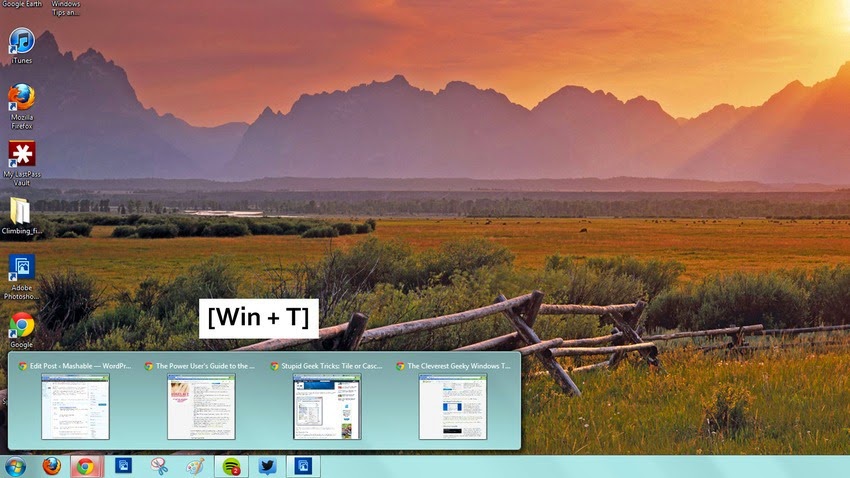
1. Select and Focus Taskbar Applications
select and focus applications in the taskbar
To select and focus applications in the taskbar, hold down the Windows key, press T, and use the arrow keys or type T repeatedly. This lets you scroll through the pinned applications without ever touching your mouse.
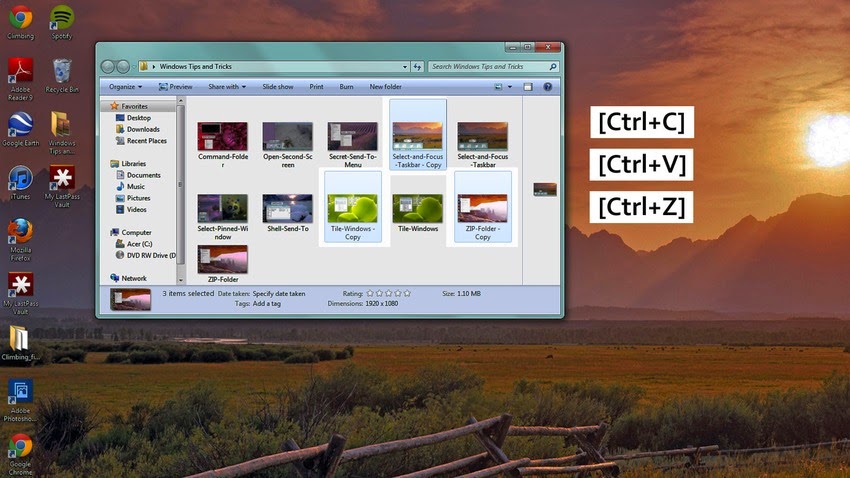
2. Copy, Paste or Undo a File Move
Cut , copy , paste
Most people know that the key commands Ctrl+C, Ctrl+V and Ctrl+Z are handy for copying, pasting and deleting text, but did you know that you can use these commands for files as well?
3. Tile Windows
Tile Windows
With Windows 7 came Aero Snap, or the ability to maximize a window by dragging it to the side of the screen. But what if you want to easily tile your windows?
Open Task Manager (Ctrl+Shift+Esc), select the applications you wish to tile (Ctrl+Click), right click, and select Tile Horizontally or Tile Vertically.Tile Vertically.
4. Open an Application
Open an Application
To start an application that is pinned to the taskbar, hold the Windows key and press the number that corresponds with its location (Win+number from one to nine).
5. Manage Your Applications
Manage Your Applications
To open a new window of the same application (for example, to open a new Chrome window or a second Desktop folder), hold the Shift key, the Window key and then a number from one to nine. If you want to page through the open windows, press Control, Window, and a number, from one to nine.
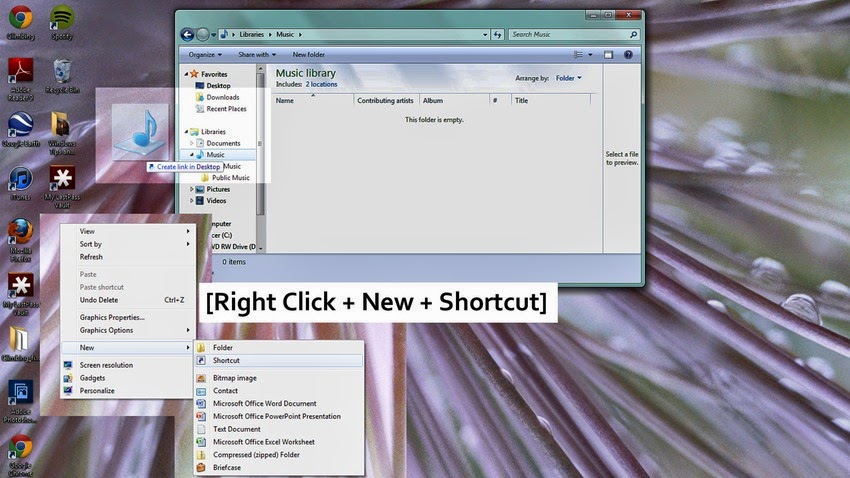
6. Pin Any Item to the Taskbar
Pin Any Item to the Taskbar
  1. By default, Windows 7 only lets you pin applications to the taskbar. But if you want to pin a different item like a file or folder, follow these easy steps.
  2. Drag and drop the file onto your desktop (If the item is in the Favorites folder, follow these extra steps)
    Right click > New > Shortcut
  3. Type in: explorer “C:shortcuts_Favorites – Shortcut_Name.lnk”
  4. Name the shortcut
  5. The Shortcut will now appear as a folder, which you can right click to pin to the taskbar
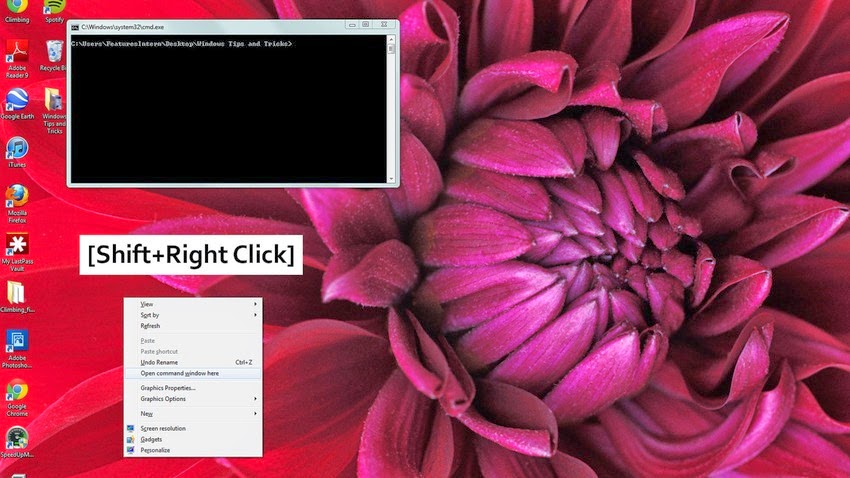
7. Open a Command Prompt
Command Prompt
To access the open a command option, hold down the Shift key and right-click a folder.
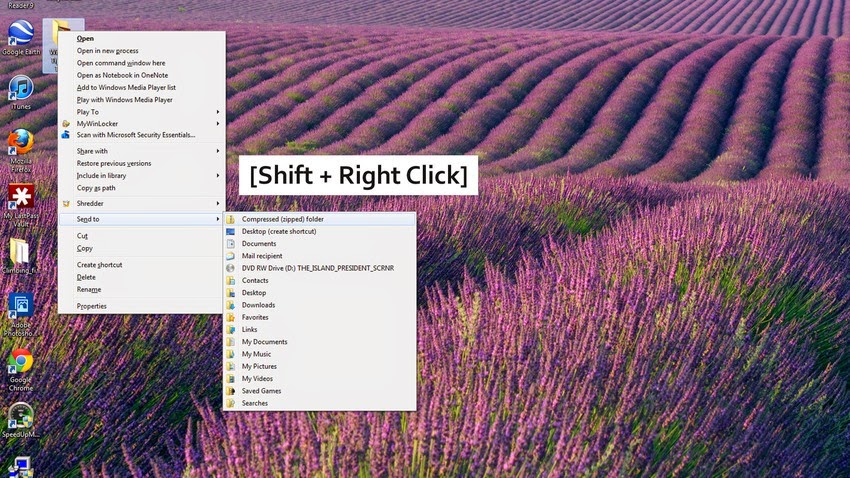
8. Access the Secret “Send To” Menu
Access the Secret "Send To" Menu
Did you know that there is a secret “Send To” menu that you can access with the Shift key? Hold down Shift, right-click the folder and select the “Send To” menu. This lets you access a whole new set of file locations, so you can quickly re-locate a folder without the hassle.
9. Modify the Default “Send To” Menu
Modify the Default "Send To" Menu
If you want to change the options that appear in your default “Send To menu,” type “shell:sendto” into the location bar of a folder. You can then drag and drop new folder locations to the Send To folder.
10. Create a Zip Folder
 Create a Zip Folder
A zip folder is the quickest way to transport a large selection of files. To create a zip folder, right click a regular file folder and select the “Send To” option. The “Compressed (zipped) Folder” option will compress your folder and make it easier to upload the files in one fell swoop.